

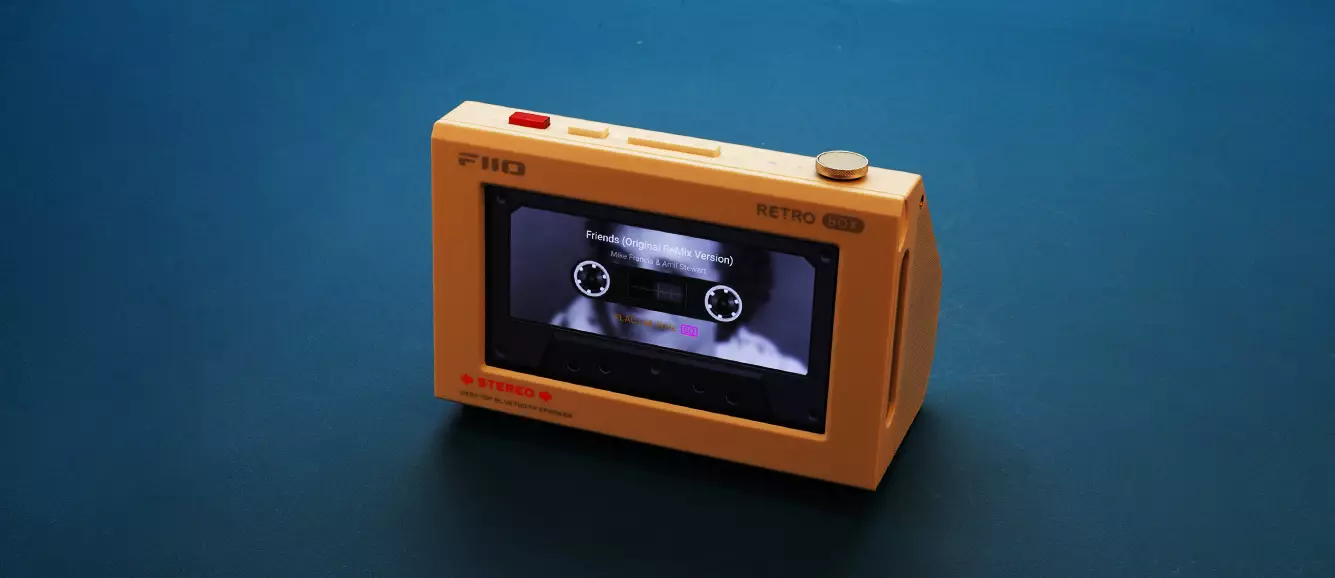
Marcelo reviews the FiiO RETRO BOX, a unique wireless-capable custom speaker enclosure compatible with the M33 R2R, M21, and JM21 DAPs. It is currently priced at $69.99.
Disclaimer: I received this sample in exchange for my honest opinion. Headfonics is an independent website with no affiliate links or services. I want to thank FiiO for their support.
Click here to learn more about the FiiO audio products previously reviewed on Headfonics.
This post follows our current scoring guidelines, which you can read in more detail here.
The word unique means being the only one of its kind, radically distinctive, without equal, or highly unusual, and it was the first word that came to mind when I first learned about the FiiO RETRO BOX.
I consider myself quite a unique person, so it was a delight to learn that I’d be reviewing the RETRO BOX, which sells for $69.99 MSRP (actual price depending on region).
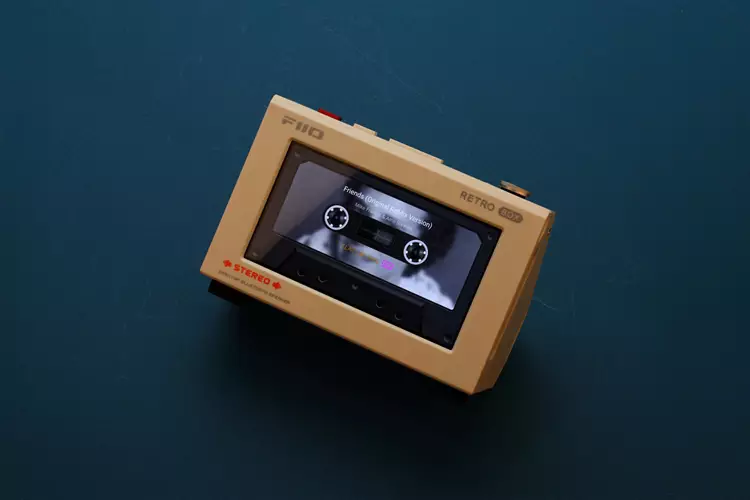
What makes the RETRO BOX a unique and exciting desktop Bluetooth speaker is the tape deck design that houses FiiO DAPs such as the FiiO M33 R2R, FiiO JM21, and M21 as an integrated music player.
This creates a unique unit that combines a vintage-looking speaker with an Android DAP as a highly capable built-in music server.
To see how easy the FiiO RETRO BOX is to use and how it sounds, I also decided to compare it to some popular portable Bluetooth speakers, such as the Anker Soundcore 3 and the Marshall Emberton in my full review below.
Features
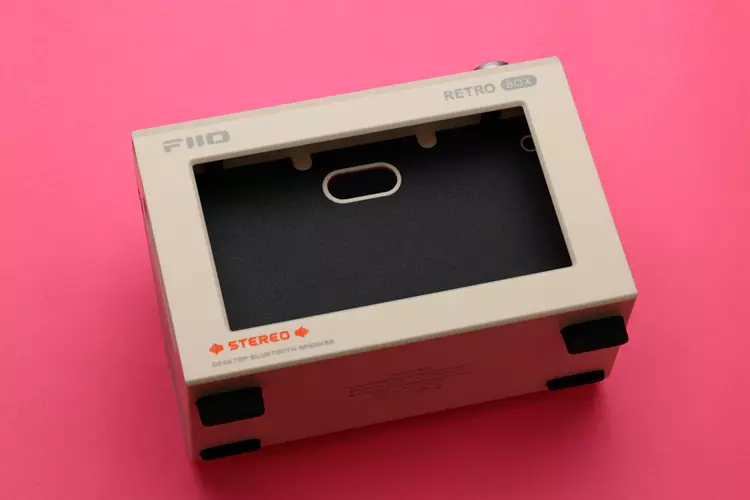
The RETRO BOX is a portable desktop Bluetooth device with a special housing that integrates the FiiO JM21, M21, and M33 DAP series inside, making the DAP and the RETRO BOX appear as a single unit.
Though only three DAPs are currently fully compatible for loading inside, I strongly suspect that more models will come out as FiiO expands their DAP lineup.
The RETRO BOX features 2 x 40 mm full-range speaker drive units, each coupled to a passive radiator with its own separate acoustic chamber, and each speaker is connected to a stereo amplifier with 5.3 Watts per channel.
Other features include the latest Bluetooth 6 and USB DAC connectivity with UAC 1.0 compatibility.
Design
The RETRO BOX is available in white and black, but my review sample came in white. The color is more off-white with a slight beige tinge, which looks like PC and monitor casings from the 80s and 90s.
Even though the whole RETRO BOX body is made of plastic, including the door for the DAP, I’m glad that I got the white color as it really brings back memories of the 80’s and early 90’s when my PC looked and felt like the RETRO BOX.
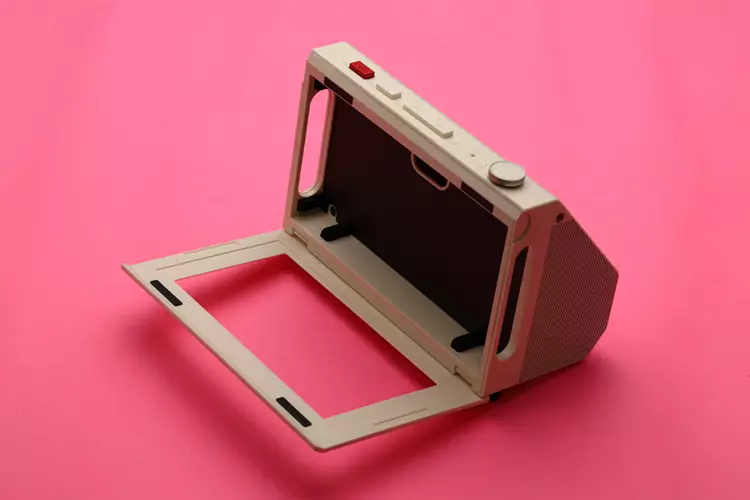
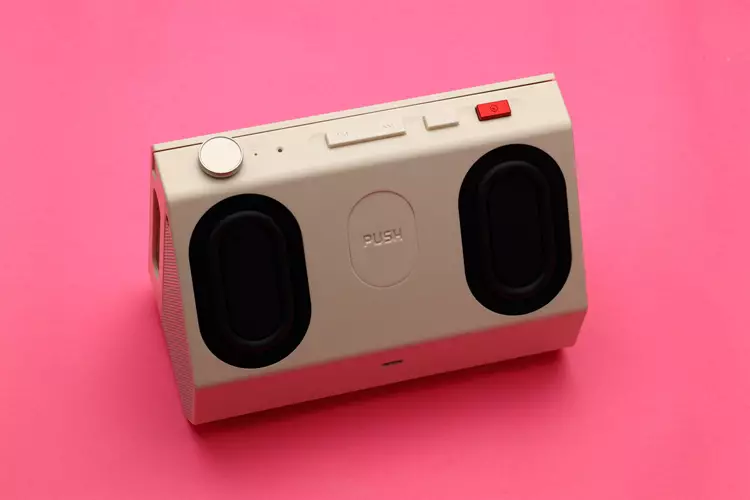
The cassette door has a hinge at the bottom and a couple of magnets near the top to hold it in place when closed. The M33 R2R fits snugly in the cassette deck, and a mechanical push button in the rear, in between the passive radiators, pushes the DAP towards the front for easier DAP ejection.
Of course, you can still use the pairing even if the DAP is outside the tape deck, since the connection is entirely via Bluetooth.
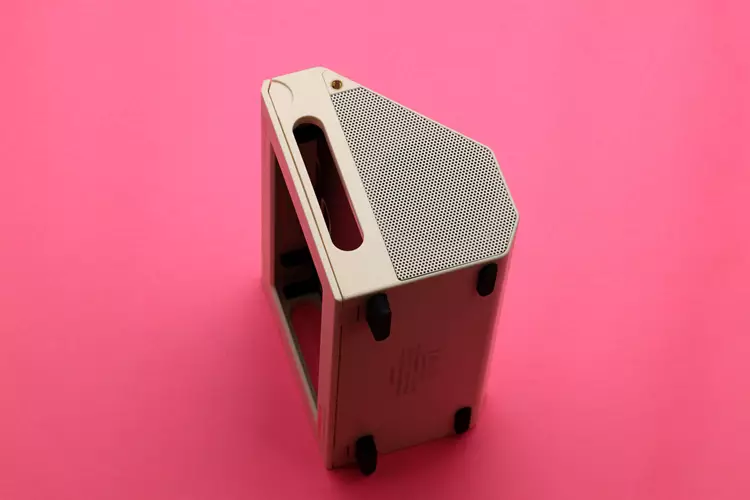
There are provisions for accessory mounting, like a shoulder strap on each side via threaded screw holes; however, FiiO didn’t include a shoulder strap in the package.
The RETRO BOX isn’t very big, at only 152.8 mm × 98.8 mm × 76.0 mm, and it weighs only 683 grams. Though not the most portable or the lightest, it isn’t impossible to transport without much hassle. Its size and shape look really good on a desktop.
Ease of Use
I initially imagined the RETRO BOX would be daunting to use and would require a steep learning curve to master, given its unique nature. It turns out I was completely mistaken, as it is much easier to use and has simpler functions than I imagined.
Without reading the manual, I tried to use the RETRO BOX to test how intuitive it is. With my FiiO M33 R2R DAP on standby, I turned on the RETRO BOX and long-pressed the play button; it entered pairing mode, so I enabled Bluetooth on my M33 R2R.
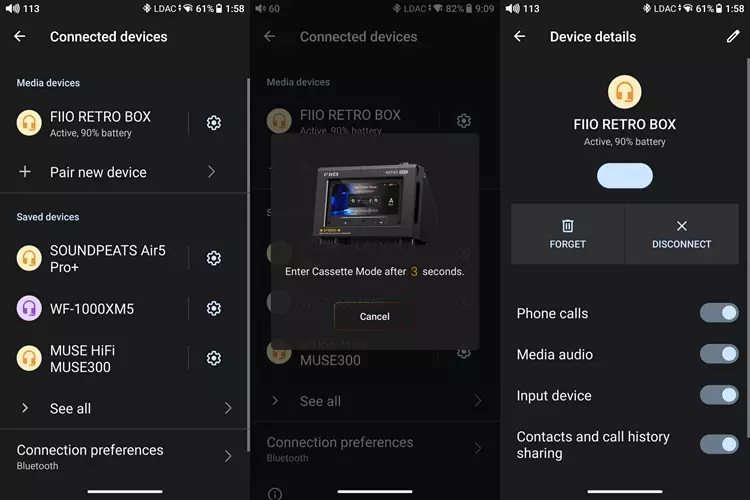
The RETRO BOX was found immediately, and I paired them. I’m using the latest firmware for the M33 R2R, and after Bluetooth pairing, it will enter tape mode with a cancellable countdown. I imagine this is the same process with the FiiO JM21 and M21 DAPS.
There is an adapter lining inside the tape deck area that must be removed for the M33 R2R to fit; however, when using the FiiO M21 and JM21, the adapter lining must be left in place so both DAPs fit.
I/O
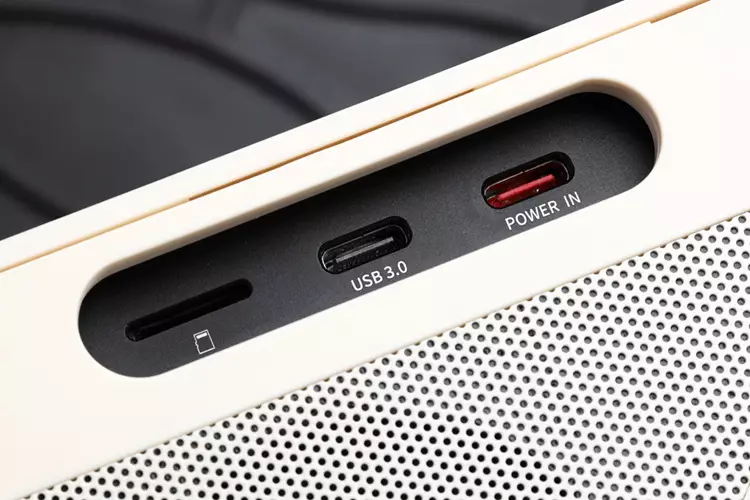
The RETRO BOX has only one USB-C port at the back, which serves as both a charging and data port for audio input and presumably firmware updates.
However, when a DAP is docked inside the tape deck, there are slotted holes on each side that allow access to the DAP’s top and bottom.
The power button and the 3.5 mm and 4.4 mm output jacks are on the left, while the charging port, data port, and microSD card slot are on the right on my M33 R2R.
Controls & Navigation
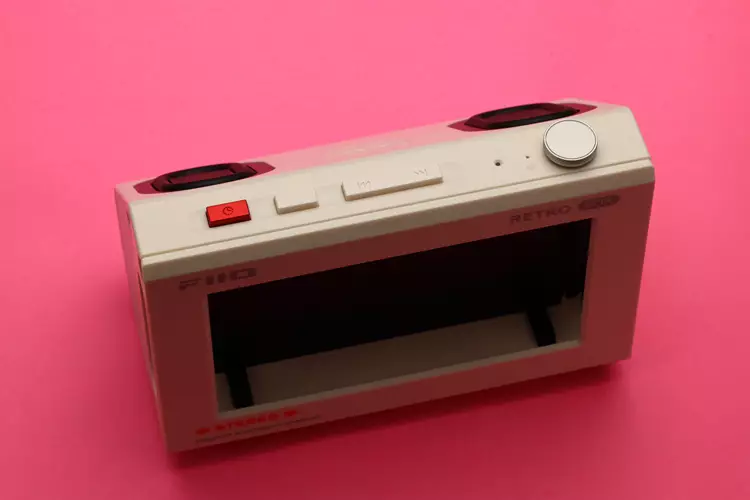
All the controls are located at the top, starting at the leftmost: the red power button, followed by pause/play, previous track, next track, and finally the knob. These controls directly control the paired DAP.
Though I did have to read the manual to learn these controls, they are still very intuitive and easy to remember.
Aside from serving as a power button with long presses, the red button also switches input modes between USB-C and Bluetooth when clicked twice.
Additionally, it can turn off the DAP’s screen with a single quick press, which I find to be a big bonus, as I like to preserve the DAP’s screen as long as possible.
The play/pause button works as intended, but when pressed for 3 seconds, RETRO BOX enters Bluetooth pairing mode; when pressed for 10 seconds, it clears all Bluetooth pairings and volume memory, then shuts down.
The previous and next track buttons work as intended. Still, when either is pressed twice, they switch the theme on the DAP’s screen from different tape designs and multiple analog-style stereo dial level indicators to spectrum analyzers too many to count.
The knob serves as a volume control when turned, but when pressed, it switches the EQ style among HiFi, Retro, Pop, and Warm during music playback. A voice interrupts the music to indicate which EQ is selected, which I find slightly annoying.
Lastly, long-pressing the volume control button summons the voice assistant.
Display
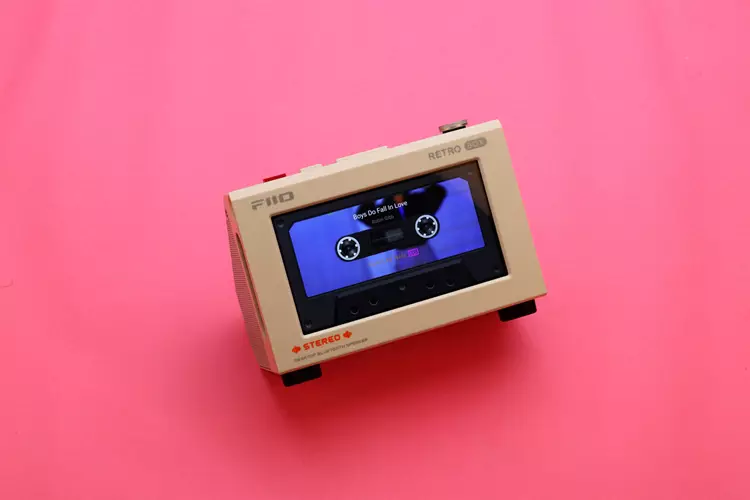
Though RETRO BOX has no display of its own except for a single tiny LED indicator on top, it uses the docked DAP’s screen, which dominates the front fascia of the RETRO BOX with touch capability.
However, because of its horizontal orientation, it isn’t very useful for some apps, so I often use it in tape mode.
Connectivity
Bluetooth
RETRO BOX is equipped with the latest Bluetooth 6 and the LDAC audio codec, which means there is minimal delay and the best-sounding Bluetooth audio currently available.
The initial pairing with my phone and FiiO M33 R2R DAP is straightforward and fuss-free. And the subsequent Bluetooth connection is fast. I never encountered any circumstance in which it didn’t connect.
RETRO BOX automatically chose the LDAC codec in my phone and M33 R2R DAP. I got excellent Signal reception with my phone as the transmitter using the LDAC codec.
I managed to be 10 meters away from the source, walking around my house with the usual obstructions like concrete walls, tables, and other objects, without experiencing any signal dropout or sound degradation.
USB Input Mode
RETRO BOX has only one physical connection: the USB-C charging and data port at the back.
Though I can connect the docked M33 R2R via USB instead of the wireless Bluetooth connection, the wire running from the side to the back looks unsightly, and the supposed gain in sound quality is not audible at all.
The manual and product page also warned that the RETRO BOX’s USB port draws a considerable amount of current from the connected device and thus advise against connecting a phone or a DAP; however, it still worked with my phone and DAP when I tried it.
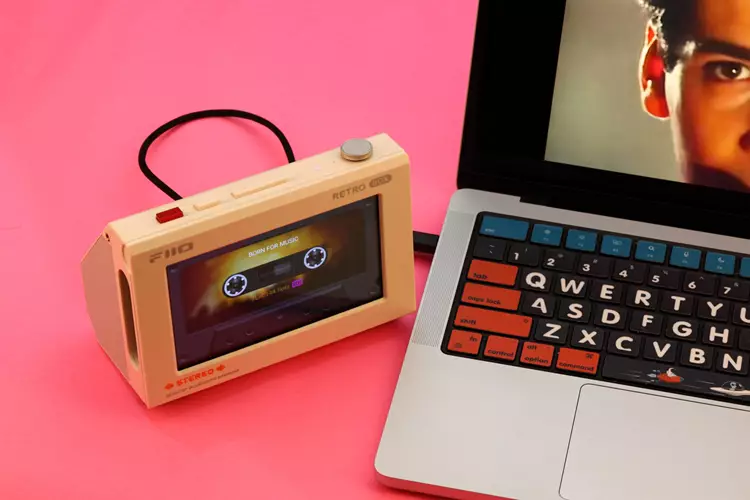
FiiO advised that the RETRO BOX is better connected to a laptop or PC rather than to phones, so I tested it with my MacBook Pro M5 and enjoyed the combo while watching and listening to YouTube and writing this review.
Battery Life & Charging Times
The RETRO BOX is equipped with two 18500-size internal batteries wired in parallel, giving it a 10.5-hour battery life according to FiiO.
When I tested the battery life during the burn-in period, I got around 9 hours and 45 minutes of playtime at a moderately loud volume with an LDAC connection.
I can easily imagine that if I used the SBC Bluetooth connection and turned down the volume a bit, I could easily achieve the 10.5-hour battery life figure given by FiiO.
After emptying the battery during burn-in, it took me 2 hours to charge it from 0 to 80%; 0 to 100% should take about 2.5 hours, as FiiO stated.
Packaging & Accessories
The RETRO BOX came in an appropriately sized sealed box measuring 182 x 127 x 102 mm with a photo of the RETRO BOX in front and text all around.
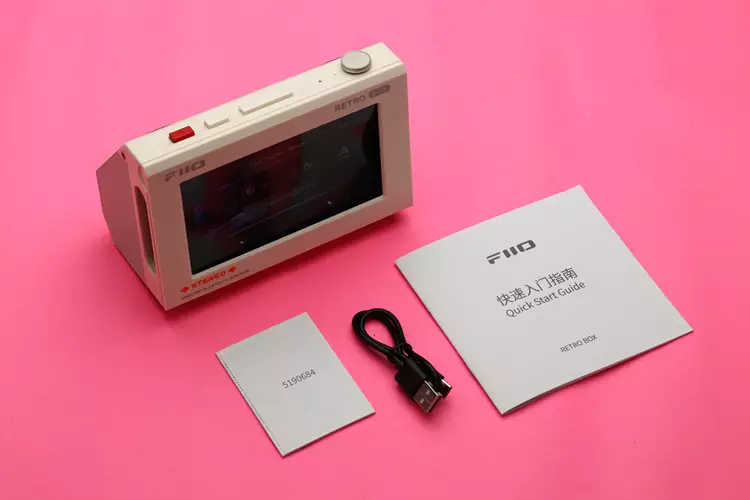
The packaging is effectively designed with some foam protection inside. The package includes the RETRO BOX, a user manual, a warranty card, and a USB-A-to-C cable.
Sound Impressions
Before critical listening, I performed a 12-hour burn-in on the RETRO BOX, which I do on almost all review units, regardless of purpose. This is to test the battery and allow the drivers and passive radiators to settle before listening.
I tested the RETRO BOX with my laptop, PC, phone, and FiiO M33 R2R DAP, but for most of the time I used it with the M33 R2R docked inside the tape deck.
For my listening, the RETRO BOX and the M33 R2R are wirelessly connected, mostly using the HiFi EQ style but also tried the retro, pop, and warm EQ styles at times.
Summary
I have tried the RETRO BOX in various positions, such as on the center table in my living room, the console table, the TV rack, the dining table, and the kitchen center table.
I found that the most glorious sound the RETRO BOX had was when I placed it on my computer desk near the corner of a room.
It turns out the RETRO BOX needs the boundary sound reinforcement from the table and the wall for the best, loudest sound and the lowest bass extension.
When placed farther from the wall, the RETRO BOX only reached down to 90 Hz in my estimation, but when placed on my PC desk near the corner of the room, I heard greater loudness and bass extension down to 65 Hz, as stated in the technical specification.
In the default HiFi EQ mode, the RETRO BOX sounds amply natural with balanced bass, midrange, and treble presentation, with just a slight midrange forwardness.
The bass has good punch even though deep bass is absent. What bass there is available can keep up with the rest of the music even at maximum volume without making the sound thin.
I find the midrange quite smooth and flat in its frequency response, making the vocals and instruments clear to hear, and there is also good energy that makes the sound musically engaging.
Treble is very extended with good air; however, it is not the smoothest, as I hear some minor peaks in some areas. It never becomes piercing and fatiguing, though, and is well balanced with the bass and midrange.
Other EQ Styles
When I switched to Retro mode, the sound became focused in the lower midrange, and the treble was heavily attenuated, as if someone had cut the wires going to the tweeter.
This makes the RETRO BOX sound really retro, and I must say the Retro mode is convincing and quite enjoyable, especially with 80’s Japanese pop music.
I was expecting the Pop mode to counter the tonal balance of old pop music; instead, it exacerbates it. To my displeasure, the sound becomes even thinner, with less bass and more treble, making it shrill and fatiguing as background music.
The Warm mode is essentially the HiFi mode, with the treble moderately attenuated to give a warmer sound.
Coloration
The RETRO BOX generally sounds natural on its own, especially in HiFi mode, and aside from the bass cutoff, which is to be expected given its small drivers, there are not many glaring sound quality issues I can find.
However, in critical listening, which is overkill for such a small speaker and compared to other Bluetooth speakers, I can hear a faint plastic coloration from the vibration of its plastic body. The RETRO BOX never sounded muddy, though.
Staging & Dynamics
Thanks to its relatively even frequency response and clean, airy treble, the soundstage is quite spacious.
Even when walking around the room and not listening along its center axis, I can still perceive the spaciousness of the musical performance, with a good sense of space between the vocals and instruments.
However, when seated at the center axis to assess imaging performance, the image is not well-defined, which I attribute to the side-firing position of its drivers.
Despite its small footprint and lack of true deep bass, the RETRO BOX never seems to lack in dynamic range. The bass is punchy and speedy, the midrange is bubbling with energy, and the treble is lively without being fatiguing. The RETRO BOX has good energy and sounds engaging.
