

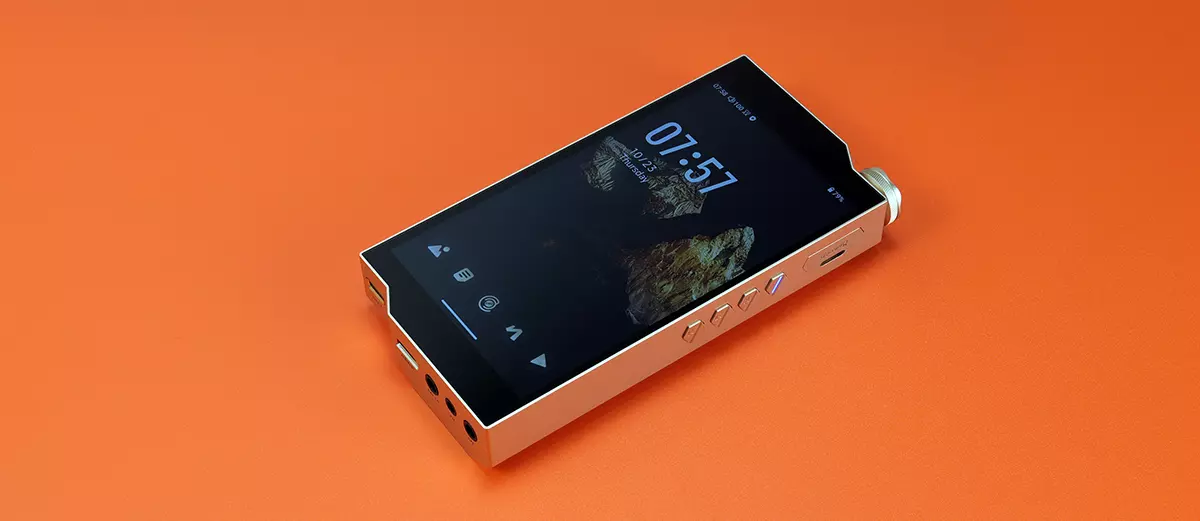
Software Impressions
The following software impressions of the HiBy RS8 II were completed using firmware version 1.50. My focus here is primarily on the new features and tweaks introduced since the RS8 and, where applicable, the R8 II.
Android Platform
The HiBy RS8 II’s OS is a mixture of good and bad news.
Arguably, some will be disappointed that HiBy didn’t come ‘flying out of the blocks’ with Android 14 or higher since this is a flagship offering.
Considering budget DAPs such as HiBy’s R4 and FiiO’s JM21 come loaded with Android 13 since 2024/2025, and Google has an AOSP date of Q2 2026 for security support, I would hope there is a pathway for Android 14 at some stage.
However, the good news is the choice of SoC and RAM allocation. This OS is effectively ‘supercharged’ with Qualcomm’s Snapdragon 8 Gen 2 processor (QCS8550) and 16GB of RAM. That is 8GB more RAM than the recently released iBasso DX340.
That makes a massive difference to the performance speed and multi-tasking capability of this player.
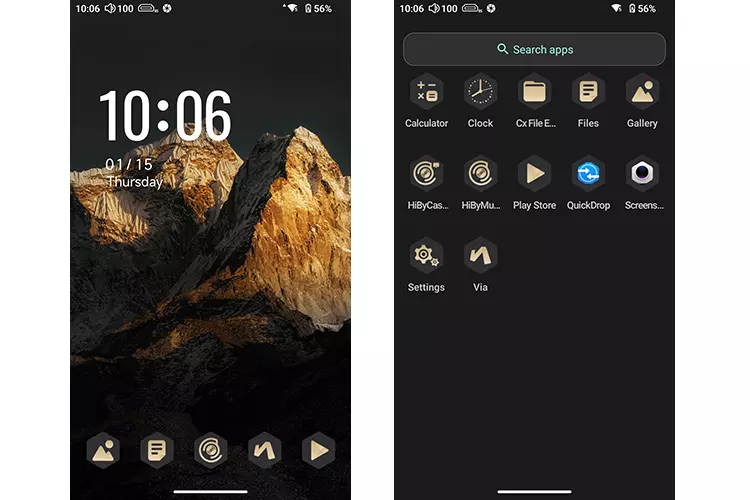
The stock version is not exactly bloat-free, but it is relatively clean by modern-day smartphone standards. Like the original RS8, HiBy has heavily themed the app-tray platform with a unique DARWIN-centric aesthetic for background wallpaper and icons.
It will take some getting used to, as many of the icons save for HiBy Music are new, though you can revert to a vanilla Android look either via the settings or a Theme-specific controller app from the Play Store.
Out of the box, the RS8 II uses a global-ready ROM, meaning access to Google’s Play Store and Play Services are active by default.
However, you will need to download Chrome if you want to browse the web with a degree of familiarity. The default Via Browser is nowhere near as capable.
Performance Benchmarking
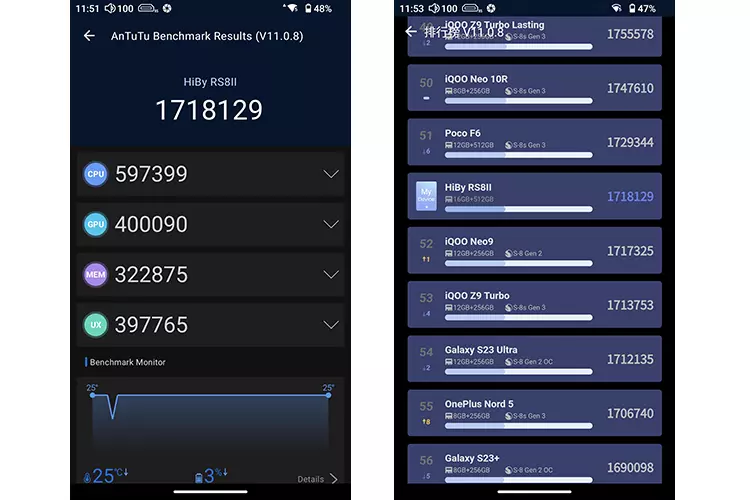
The RS8 II is the best-performing DAP I have ever benchmarked on Headfonics. The score is almost 10X greater than the original RS8 and 6X faster than the DX340.
In fact, looking at the submitted test scores on AnTuTu’s Rankings chart, it’s actually higher than user test submissions for the likes of the Samsung Galaxy S23 Ultra, which was my trusty smartphone up until August of last year.
More than that, the thermal throttling was minimal at a solid 25 °C throughout the AnTuTu 3D Benchmarking process.
Typically, I see the SoC heat up to 35-40 °C during the same test (albeit with earlier AnTuTu versions), so the additional RAM is really keeping an effective lid on the CPU workload inside the RS8 II.
Navigation
Moving from the RS8 Android 12 platform to Android 13 brings subtle rather than overt changes to the RS8 II navigation. The experience is more about speed and responsiveness than anything else.
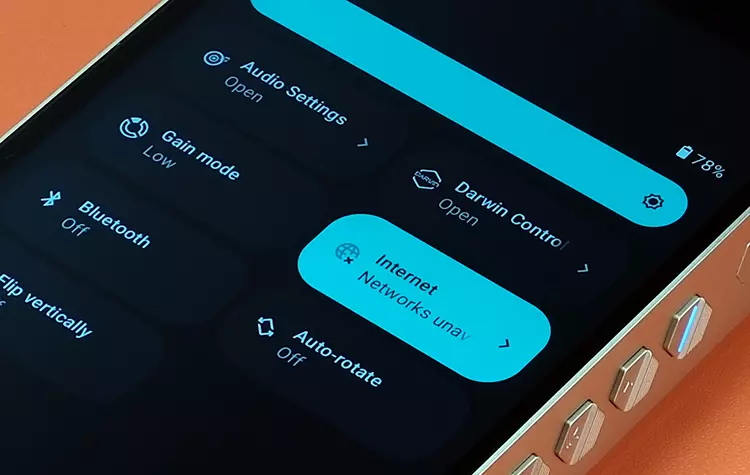
The drop-down options bar operates in much the same manner, but with a more refined graphical layout. The major shortcut change in the drop-down menu is direct access to the new Sankofa AI feature rather than core Android framework tweaks.
Small tweaks also include an active apps counter at the base and moving the power and settings icons closer together on the far right. The clock face at the top of the bar is also bigger than before, making it easier to read.
The RS8 II comes equipped with gesture-based navigation out of the box, which some prefer. If you’d rather have the 3 icon system at the base of the screen, you can change it to that in the Main Settings, Accessibility section, similar to a smartphone setup.
You can also switch between dark and bright modes, and the OS will apply that throughout the system. Dark mode is turned on by default, which I much prefer for its calming effect on my eyes.
Drop-down menu options that have disappeared include the amplification class swapper, as this is now a bias slider in the audio settings and not something you can control from within a drop-down navigation suite.
Darwin Controller
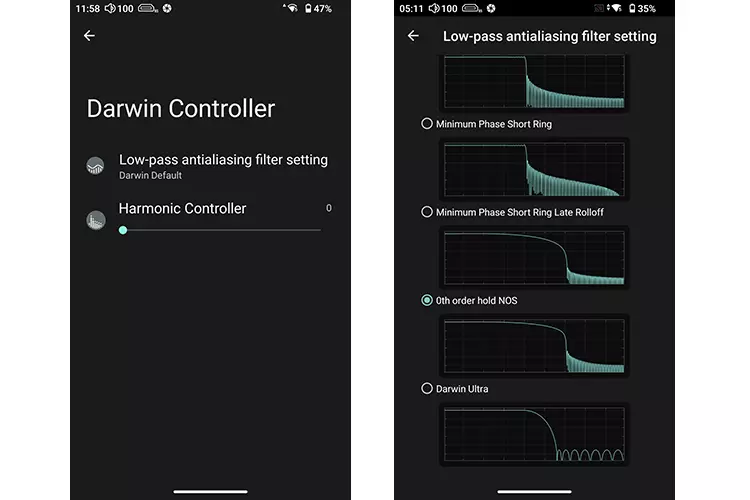
The RS8 II Darwin Controller options are reduced in this current firmware version, though the list of low-pass digital filters is more comprehensive and logical, with actual labels.
Gone are NOS, Atmosphere Enhanced, and the in-depth customized presets that HiBy spent a long time building up over the lifecycle of the original RS8.
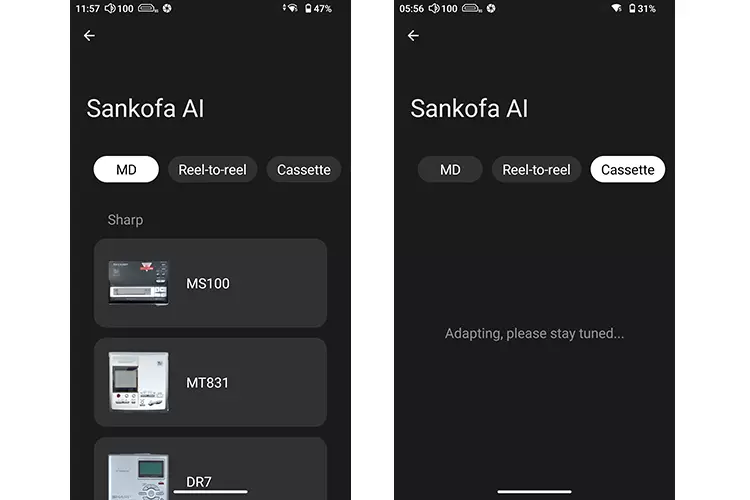
My personal opinion is that the customized preset feature thought process has now evolved into Sankofa AI. You now have a hardware tone clone approach to retro gear, as opposed to purely IEM presets created by the manufacturers.
I can see the benefits of both approaches. Sankofa AI taps into the current retro-vibe happening now and is more controllable from HiBy’s perspective. It has mass appeal as many would want to hear how things might sound from a virtual Mini Disc or Cassette Player.
Whereas customized presets target specific IEMs that you may or may not own. Great if you have them, and largely irrelevant if you do not.
The disappearance of the NOS/OS option is surprising, considering how popular these are for R2R fans. The digital filters include NOS, but it would be nice to have “true NOS” at some point.
Sankofa AI
In case you are wondering what Sankofa means, it’s a traditional Ghanaian term meaning “to return to get”, or about learning from the past to build a better future.
And in some ways, that is how HiBy is approaching this option. Delve into this section, grab some iconic gear from the past, and see how it can shape your listening experience, ideally for the better depending on your preferences.
Right now, however, it seems to be early days as the RS8 II only has one out of 3 possible categories filled with retro gear tuning profiles that you can try out. I expect a lot more with subsequent updates, and hopefully soon.
What you get now is the Mini Disc section. I was late to Mini-Discs in 2005 with a Sony MZ-RH10. Primarily due to the launch of Hi-MD discs, which had better capacity (1GB) than the standard discs and were more durable than older iPod HDDs.
I didn’t hold onto it for long due to personal reasons, but I did remember thinking it sounded excellent and much better than my old Zune 30.
There is no MZ-RH10 in the tone clone profiles via Sankofa AI, but you get an MZ-NH1, which should be close enough. Other brands include Panasonic and Sharp, with a total of 8 profiles currently available. I will go through the various tweaks in my sound impressions on page 3 of this review.
Audio Settings
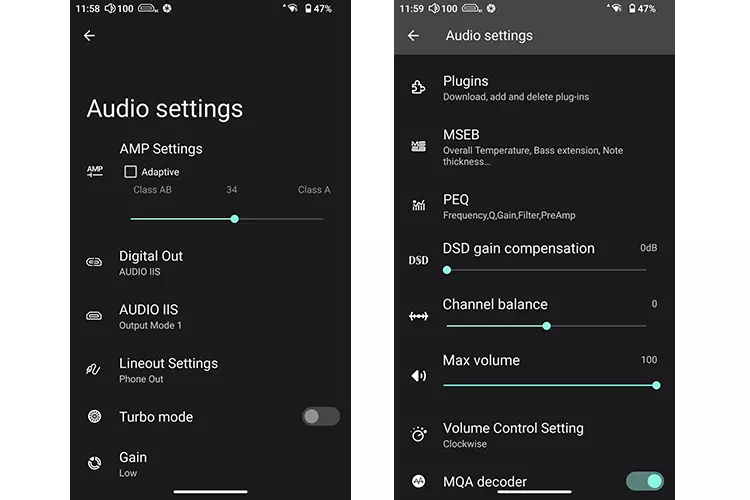
The big change in the RS8 II Audio settings is the switch to adaptive amplification. In the original RS8, you could opt for Class A or Class B, but it’s no longer a binary choice on the RS8 II.
Instead, you have a bias slide to control the Adaptive Amplifier in terms of how much Class A or how much Class AB you want the RS8 II to use during playback.
You can opt for pure Class AB or Class A by moving the slider far left or far right, or keep it in the middle and have faith in the RS8 II picking the right time to use the right Class for maximum effect.
The second major change is the introduction of I²S digital output alongside SPDIF. That’s huge for me personally, as I prefer the performance over USB into my main desktop DACs.
You get three pin configuration choices in the sub-menu, ensuring more flexibility in compatibility, an important aspect since I²S is not yet a standardized connection protocol. Not every DAC I²S pin configuration is the same.
Because the RS8 II 3.5mm output is now a dual-functional port with PO and LO duties, you will find a software switch in the audio settings to set the desired output mode for playback.
The available downloads for the plugin section have been reduced. Before you had options such as Mastermind and DRX10K Dynamics for the RS8, plugins that are not currently available for download on the RS8 II.
The MSEB tuning style options have been retained but moved to a sub-menu labeled as “None,” which could be improved to something more proactive, like “plugins”. Options such as Hot Monster Output are still available. This is a great plugin to enhance the dynamics and energy of recordings.
Connectivity
WiFi
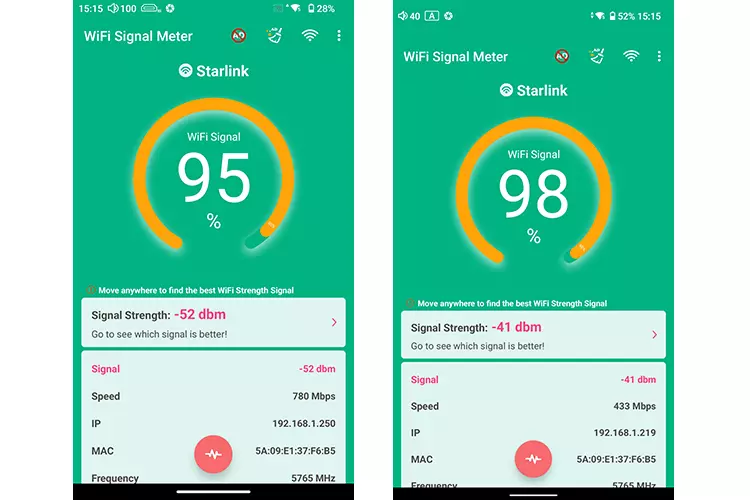
For this comparison, I measured the RS8 II against the RS8 about 10m away from a Starling Gen 2 modem. I ran the test for a total of 10 minutes whilst keeping the DAPs beside each other, in a fixed position.
In the signal test picture above, the first screenshot is the RS8 II, and the second is the RS8. Pay no attention to the % difference, as that fluctuates quite rapidly, and the margin of error would likely mean there is no real difference.
Rather, I recommend you focus on the speed indicator reading, and here you can see a massive difference in the Mbps speed of the RS8 II, which is almost double that of the original RS8 using 5G.
That means, all things being equal, the more advanced Wi-Fi 7 inside the RS8 II will vastly outperform the older dual-band 2.4GHz/5GHz Wi-Fi module inside the RS8 for streaming and data transfer.
Bluetooth
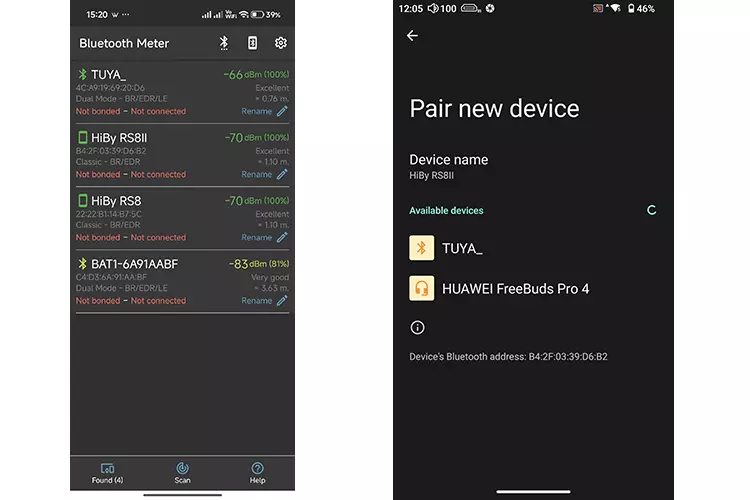
The BT module has improved from BT5.0 to BT5.3, but the signal strength and pairing process of the RS8 II Bluetooth feature are largely unchanged from the RS8 experience.
On the left-hand side screenshot from our testing, you can see that the RS8 II and RS8 BT signals measured the same from 20m away (actual distance).
I also noticed that HiBy uses a Classic BR/EDR module rather than a newer LE module capable of using the LC3 codec for better performance with lower bitrate recordings, and reducing battery consumption at the same time.
USB-DAC
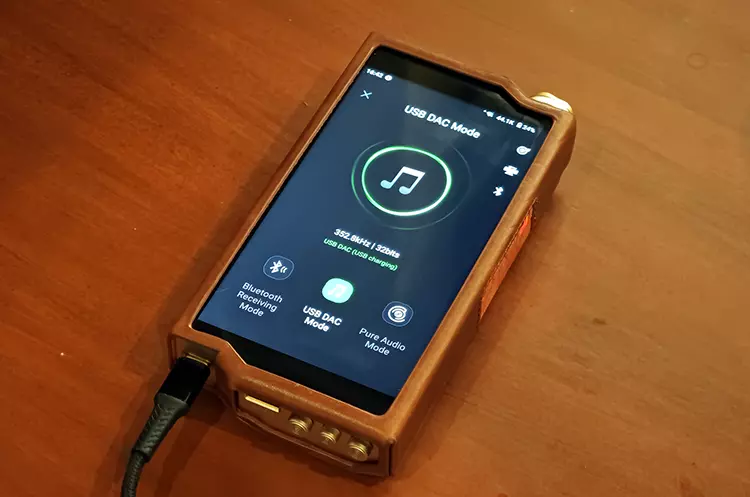
The RS8 II is plug and play for MACs and ideally, there should be no issues with USB 2.0 universal handshakes on Windows devices, but you can download the USB DAC driver from the HiBy website should you need it.
There are a few important things to note if you are a MAC user. First, the MTP protocol used by the RS8 II conflicts with Google Drive if you have it mounted. You need to quit out of Google Drive to ensure the player mounts in MTP for file transfer. This does not affect the USB-DAC functionality.
The second is how it integrates with ROON. Generally speaking, it works fine as it shows up in CorePlayer mode (Apple’s native audio framework for bitperfect playback) and has no issues receiving DSD, PCM, and MQA audio. However, unlike the RS8, the RS8 II is not yet Roon Ready (RAAT).
USB OTG
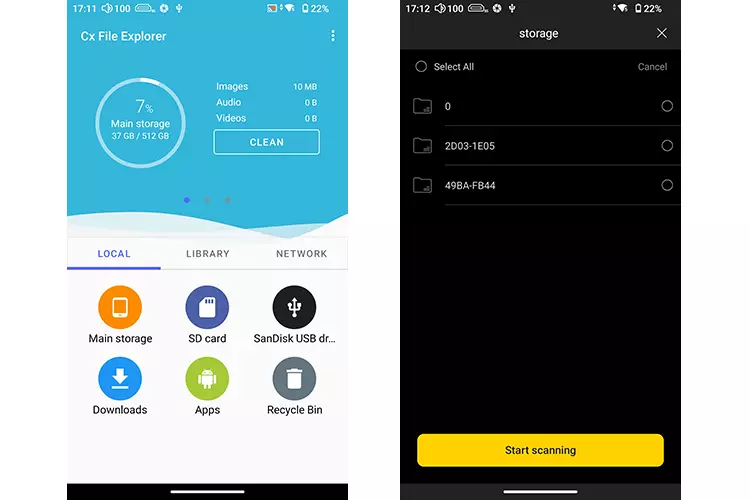
Flash expansion via USB-OTG has no issues using a 64GB SanDisk flash drive.
What I have always liked about HiBy Music is the ability to recognize an OTG drive, scan it, and integrate all the audio tracks right into your library. The RS8 II is no exception to this rule.
Also, USB OTG digital audio to a dongle or larger OTG-compatible desktop device worked just fine. However, you will need to ensure the Exclusive HQ USB audio access option is turned on when using HiByMusic, otherwise nothing will happen.
Click on page 3 below for my sound impressions and recommended pairings.
