

Synergy
I couldn’t hear any noise with IEMs and headphones. There is no hiss, clicking, or popping sound when the device is in operation. It is clean and noise-free.
It sounds great with all the IEMs and headphones included in this review, as long as I don’t push it too far and stay within its 215 mW power output rating, even with the heavy load of the Kiwi Ears Etude’s 5Ω impedance.

IEM Pairings
Due to its neutral and natural sound presentation, the V1 is not fussy when it comes to pairing; it pairs well with all the IEMs in this review, including the Kiwi Ears Etude and MOONDROP Harmon.
I noticed a slight welcome reduction in treble sharpness with the Kiwi Ears Etude, without losing too much air in the upper treble, while remaining neutral.
There is an observed slight reduction in bass and darkness to the sound of the Harmon, which I like, because it makes the Harmon more neutral and more forthcoming with perceived detail.
Headphones Pairings
I observed a well-controlled bass with the MOONDROP Horizon open-back headphones. There is a welcome tightness to the bass and a reduction in darkness in sound, making the Horizon and V1 a good pairing in my opinion.
This pairing makes the sound of the Horizon more detailed and forward, which I like, rather than the dark and laid-back presentation it usually has with warm-sounding sources.

Wireless Connectivity
Bluetooth Transmitting
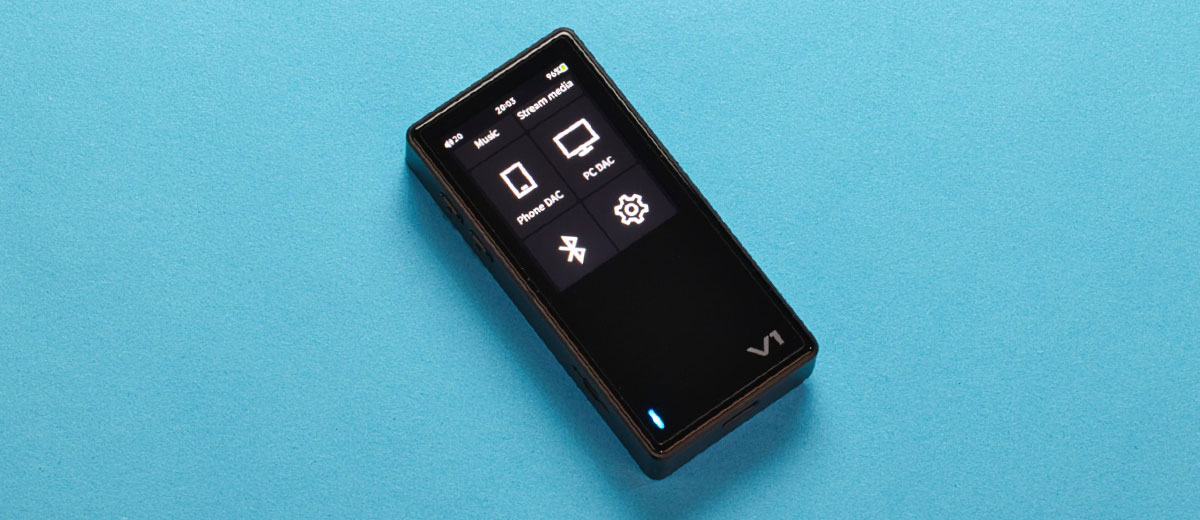
Initial connection involves setting the receiving TWS or headphones to pairing mode, then long-pressing the Bluetooth icon in the drop-down menu on the main page in V1 to access the Bluetooth settings. Next, scroll down to select the name of the unit you want to pair.
I must mention the pairing process because I was initially perplexed when I arrived at the Bluetooth settings page and couldn’t find the TWS or headphone name.
I forgot that I have to scroll down the screen to access the name list and select the one I want to connect to. This is the problem of small screens, when all the items can be shown at once on a bigger screen.
Once the initial pairing setup has been completed using my usual Bluetooth TWS and headphone testing units, namely the KZ XTRA and Sony WF-1000XM5 TWS IEMs, as well as the Focal Bathys wireless headphones, connection is fast and takes only about 5 seconds.
The V1 has all the relevant codecs for high-quality audio connections, including AAC, SBC, aptX, and LDAC.
I get a strong signal, as I can walk around the house and be more than 30 feet away from the V1 with a wall in between and still get good, uninterrupted sound.
Bluetooth Receiving
Setting the V1 as a Bluetooth receiver is straightforward and fuss-free. I just turned on the Bluetooth on both the V1 and my OnePlus 13 phone, then pressed the BT DAC icon on the main page of V1, waited for it to appear on the phone, and pressed Pair.
After the initial pairing is completed, the connection involves turning on Bluetooth on both the V1 and the phone, pressing the BT DAC icon on the V1, and then selecting “TempoTec V1” in the Bluetooth menu on the phone. This process takes only seconds.
AAC, SBC, aptX, and LDAC codecs are available in this connection. And I get a good signal reception, I can walk around the house 30 feet away with a wall in between and still get good, uninterrupted sound.
WiFi
Since Qobuz and Tidal are the only streaming apps available on the TempoTec V1, and neither is available in my country, it is unfortunate that I can’t test these apps.
And since I don’t have the setup for DLNA and AirPlay at home, I can’t test those either, but it’s nice to know that they are available.
However, I can test the HiByLink, which is easy to set up by installing the HiBy music player on the phone, then turning on the WiFi on both the Phone and the V1. After that, you turn on the HiByLink in the V1 by pressing the HiByLink Icon in the drop-down menu.
In the HiBy Music player on the phone, turn on the HiByLink controller. Once this process is completed, you can wirelessly control the V1 from your phone. The control is reasonably responsive and bug-free, consistently working as expected. Reliable.

Wired Connectivity
Digital source
With firmware version 1, the V1 is almost useless as a USB audio source for DAC/amps, as I have tried it with many DAC/amps, and only a few have worked.
Firmware version 1.1 is significantly improved, as the V1 now works with the majority of my dongle DACs. The ones it doesn’t work with are the small, single DACs that lack an internal DC-to-DC voltage converter power supply.
I hope they improve it in the next firmware release.

DAC Amplifier
The V1 can be connected to a phone using the included 10cm USB-C to USB-C cable, and to a PC using the supplied 1-meter-long USB-A to USB-C cable.
You can select in the V1’s main menu between Phone DAC and PC DAC, which, in my opinion, should be automatically done by the V1. Either mode works with whichever device it is connected to when I tested it.
I get a reliable, bug-free, and fuss-free connection when using the V1 as a DAC/amp; it also has an independent volume control, which is a plus.
Line Out
Aside from serving as a headphone output by default, both the V1 3.5 mm and 4.4mm outputs can be set as line outputs with a fixed volume, which is used as an analog source for external amplifiers.
However, you must first unplug the headphone or earphone before setting it to line output, as it can be deafeningly loud.

Select Comparisons
xDuoo X5
Technical
The xDuoo X5 utilizes a dual CS43131 DAC chip that directly drives both the 3.5 mm and 4.4 mm headphone outputs, with an output power rating of up to 270 mW.
It features a 2600mAh battery that can last up to 8 hours and charges in approximately 3 hours. It features Bluetooth version 4.2, and its card slot supports up to 1 TB of storage space. The X5 uses a 3.5-inch IPS touch screen with a 480 x 800 resolution.
Design
The X5 has a fully aluminum alloy chassis with a touchscreen at the front. A blank top, a microSD card slot on the left, three control buttons on the right, and all the I/O at the bottom.
There is a clear tempered glass panel near the top of the back side, and some lettering is located near the bottom. It features a utilitarian design and appears similarly spartan compared to V1.

Performance
The X5 is tonally warmer with a more laid-back treble and slightly laid-back vocal presentation. At the same time, the V1 has a flat perceived frequency response, neutral tonality, and even bass, midrange, and treble presentation.
I find the V1 sounds slightly more dynamic due to its snappier and faster presentation of the instruments’ leading edge, especially the snare drums.
Partly due to the warmer tonality of the X5, it has a deeper soundstage with longer decay in the instruments and vocals, offering a nice, airy presentation at the expense of slightly narrowing the soundstage.
On the other hand, V1 has an even width and depth, presenting a more accurate soundstage and images within it.
They are about equal in terms of details, instrument separation, and layering, but the V1 is slightly ahead due to its neutral and relatively more forward detail presentation, making the details easier to hear, versus the X5’s laid-back detail presentation and warmer tonality.

HiBy R3Pro II
Technical
The R3Pro II utilizes dual CS43198 DAC chips, followed by four OPA1622 amplifier chips, to drive the headphone outputs, with an output power rating of up to 480mW at 32Ω (balanced).
It features a 4000 mAh battery that can last up to 21+ hours on a single charge.
The R3Pro II features a 3.3 touchscreen with 720×480 pixels resolution. It features Bluetooth 5.1 and is compatible with memory cards with a capacity of up to 2 TB.
Design
The R3Pro II features a CNC-machined aluminum alloy chassis sandwiched between the screen on the front and an Ultrasuede fabric panel at the back.
It has 3.5 mm and 4.4 mm headphone jacks and a USB-C port at the bottom, a volume button and a micro SD card slot on the left, and four control buttons on the right.
My review sample came in orange, but it is also available in green, silver, and black.

Performance
The R3Pro II is slightly tonally warmer, with a laid-back upper treble, compared to the more neutral and flatter perceived frequency response of the V1.
What stands out for me is the punchier, punchier bass and more dynamics with the R3Pro II, thanks to its vastly more powerful output rating.
There is not much difference in staging, but V1 has a slightly larger and wider soundstage, with a more accurate rendition of image size, definition, and placement, due to its spherical soundstage presentation, compared to the relatively deep but narrower soundstage of the R3Pro II.
They are about equal in terms of details, instrument separation, and layering. Still, I find the V1 to be more transparent-sounding due to its flatter frequency response, which provides it with a slight margin of apparent separation, layering, and detail.

FiiO SNOWSKY Echo Mini
Technical
The Echo Mini utilizes dual CS43131 chips that directly drive both the 3.5 mm and 4.4 mm headphone outputs, with an output power rating of up to 250mW @ 32Ω (Bal). It features a 1100mAh battery, which allows for up to 15 hours of usage per charge.
The Echo Mini features Bluetooth version 5.3, and its card slot supports up to 256 GB, with 8 GB of built-in storage space. It features a 1.99-inch 170*320 IPS full-view HD Color non-touch display.
Design
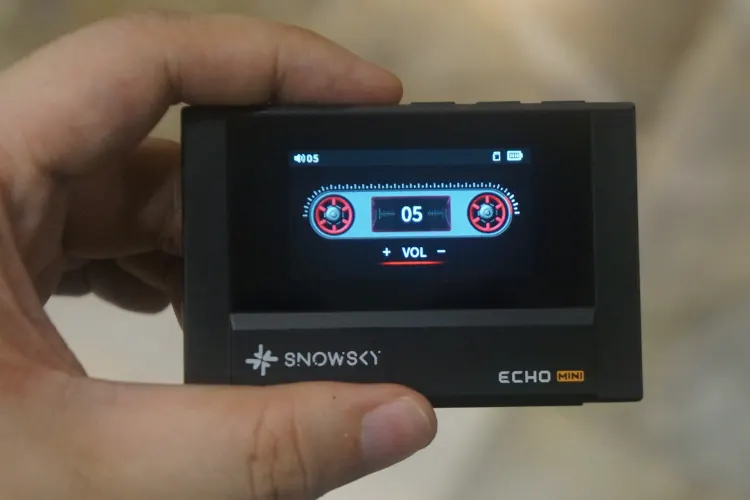
The Echo Mini has an intriguing design that resembles a retro portable cassette player from the 1980s. It features 3.5mm and 4.4mm output jacks on the right, five control buttons on top, a USB-C port, and a Micro-SD card slot on the left.
The front is shaped like the door of a cassette Walkman, featuring a screen that displays a cassette tape, giving it a realistic Walkman appearance.
Performance
The Echo Mini is tonally warmer, featuring a neutral bass and midrange, but a slightly laid-back treble presentation, whereas the V1 is perceptibly flatter across the audio range.
That said, I noticed a slight advantage in dynamics with the V1, with its faster rendition of transients.
V1 has a bigger soundstage overall; they are about equal in depth, but the V1 is noticeably wider and has more perceived height, with better imaging due to its more transparent and cleaner sound presentation.
The Echo Mini sounds warmer and less transparent, which affects its staging and imaging performance.
There is not a massive difference regarding detailing, layering, and separation; still, V1 has the slight edge due to its cleaner background decay and more transparent overall sound performance.
The Echo Mini sounds slightly hazy in the midrange and treble compared to V1.

My Verdict
Never judge a book by its cover. I initially expected very little from the TempoTec V1 in terms of sound quality, given its low price, utilitarian design, and simplistic packaging.
However, it changed my perception of the V1 after I spent many hours listening and comparing.
I appreciate the transparent, neutral sound with a wide soundstage and accurate imaging, which outperforms other DAPs in this review, as well as some of those not included in this review. I also like how easy it is to use.
However, I wish the screen were twice as big and the LED indicator on the front were much smaller and dimmer.
What stands out to me that makes the TempoTec V1 a true audiophile-sounding DAP is the way it presents the details with finesse and effortlessness without sounding bright.
This approach to a detailed presentation is similar to that of high-end DAPs, where details are not forced yet remain apparent.
That said, the TempoTec V1 earns my recommendation for its good sound quality, provided you’re okay with a non-Android-based DAP.
TempoTec V1 Technical Specifications
- Input: TF Card, USB, Bluetooth, Wi-Fi
- Output: 4.4mm BAL, 3.5mm SE, Bluetooth
- DAC&: 2*CS43131
- Sample Rate: up to DSD256, PCM 384kHz/32-bit, MQA 8X
- Bluetooth: Two-way Bluetooth 5.1, LDAC, APTX, AAC, SBC
- 0: OTG, SPDIF Out
- Wi-Fi: 2.4GHz
- Battery: 1400mAh
- Screen: 2″/ 240*320 touch screen
- TF Card: Up to 2TB
- Operating System: HiByOS (Linux-based)
- Size: 87.2mm*41.8mm*13.75mm
- Net weight: 68.67g
- Gross weight: 196g
- Max output level: 2V RMS 3.5mm, 4V RMS 4.4mm
- Output power (32Ω): 123mW 3.5mm, 215mW 4.4mm
- THD+noise: 0.00035 3.5mm, 0.00031 4.5mm
- SNR: 128 dB 3.5mm, 131 dB 4.4mm
- Crosstalk: -76 dB 3.5mm, -122 dB 4.4mm
