

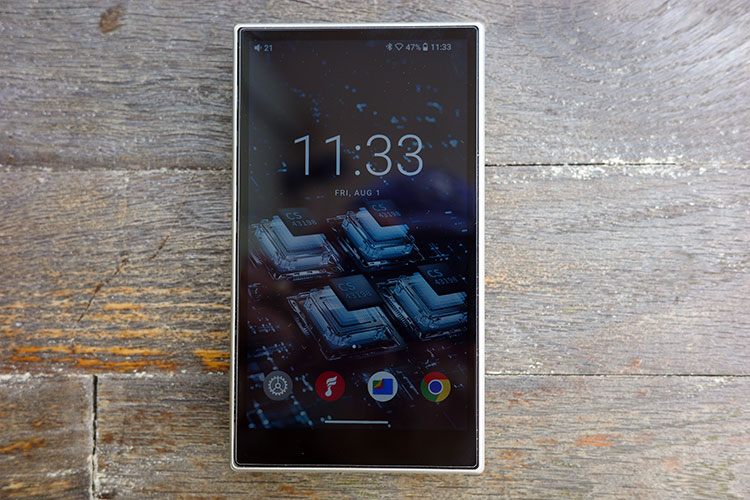
Software Impressions
When run in Android Mode, the M21 behaves like a smartphone with Play Store access, widgets, and other things you would expect from such a device.
In Pure Music Mode, Android hides in the background, leaving just FiiO Music open. Other operating modes include AirPlay, USB-DAC, and two-way Bluetooth Receive Mode, which are all selectable from the top menu (draw down from the top).
The UI functions much like a basic Android smartphone as a result. Navigation is quick between tasks.

Navigation
To anyone with a smartphone, navigation will be straightforward. But some of the “logical” settings are tucked within the apps. The EQ for FiiO Music is accessed within the user settings, as are FiiO Link, FiiO Control, and Theme.
While you can access this from the bottom row, it takes multiple steps to access what should be a front-and-center option.
Other than that, navigating was straightforward. When downloading AnTuTu Benchmark 3D Lite from their website, a privacy message would not allow installation until I gave it permission.
The option I use for testing was for previous versions of the Android OS, but it is common with what we utilize in DAPs. After permission was granted, there was the “Are you sure” pop-up, too.
Multitasking on the M21 was as good as playing music from your smartphone while surfing the web. There were only a couple of small missteps between options.

Apps
Tidal and Qobuz are included with the downloaded apps, as is the Play Store and some others. Downloading others was quick and painless, as was their operation.
FiiO does not give the warning for the M21 that they do for the JM21 regarding surfing and music playing. Both surfing and playing music happily coexisted.
Filters
FiiO gives you plenty of control over the M21, sound-wise. Under settings, you have options for adjustable gain levels (low, medium, high, with super high in desktop mode) and several digital filters.
Bluetooth Audio decoding (LDAC, LHDC, aptX-HD, aptX, AAC, SBC; device limited), Channel Balance, PO & LO options, SPDIF outputs, and a global 10-band EQ that works across all apps and outputs are also included.
The EQ is simple and intuitive, with an option for a Parametric EQ, delving further into equalization.

FiiO Music
Jumping into the native FiiO Music app, I quickly scanned my micro-SD card in less than a minute for the 2300 songs.
The app navigation is relatively complex because of all the functions offered, but I feel the user interface is still not as intuitive as I would like.
Having to scroll through many options with little familiarity didn’t help, but once that was taken care of, the functions on the app became better in use.
A nice feature is sorting by genre, which can come in handy when the mood fits. Lacking are the customization features of the HiBy music app, which are gigantic. That said, there is a reason, as the main focus is again the music.
EQ
The EQ is placed under the “user” icon on the bottom right (not applicable to DSD playback). Most apps today require a sign-in for full functionality, but I did not create an account. Even so, there was a vast amount of information and options to be had.
EQ can be changed to Parametric here. You can link to a specific FiiO server for further options, connect a FiiO device under FiiO Control, or change the theme and background.
The “Lab Features” allow for audio effects, DLNA transmitting and receiving, or folder listing in multi-line displays. While this is nice, it seems a bit cumbersome and less than intuitive.
PEQ
This function is very user-friendly, with the ability to change any of ten frequencies (which can be user-defined) with three filter types: Peak, LowShelf, and HighShelf.
In addition, the gain can be altered with a +/-12 dB impact and Q from 0.25-8.00. Both of these come in quite handy and allow for customization.
A small number of sound effects can happen as well. Within this submenu, four rotating dials allow for channel balance, bass, treble, and my favorite, Stereo Expand.
All take immediate effect, which is nice to hear. The outer edge of each “dial” is lit, going from green to yellow to red, corresponding to increased influence (and potential distortion) on the music being played.
Cassette Mode
Using the M21 inside the “cassette case” gives the impression of an old Walkman.
When the M21 is inserted (only one way) into the case, it automatically switches to a landscape “cassette” complete with spinning cogs. The artist and song are then listed where you would have labeled the cassettes of yore.
Access to the touchscreen can be had by long pressing the red button on the case (what would have been the old “record” button in days gone by). You can then switch music apps or do anything you would do without the case.
There is also a small arrow on the top left of the cassette screen that allows you to back out of that mode.
Closing the plastic door does not automatically reactivate cassette mode, but there is a widget on the home screen that can be used for that purpose, or the red button on the case itself again.
The case might be a good way of protecting the M21, since to use it, you must take the other case(s) off.

Connectivity
Bluetooth Transmission
Pairing the M21 with the Noble FoKus Apollo was quick and easy for LDAC connectivity. Connection to the Edifier Stax S10, using aptX CODEC, took a couple of tries, but eventually worked.
Pairing for both was solid from one end of my house to the other, a distance of 40’ through two walls and many potential disruptions.
This performance puts it in the above-average range, but it falls behind my iPhone 16 Pro Max.
Bluetooth Receiving
Pairing to my iPhone 16 Pro Max was as easy as BT transmission mode. The signal was limited to AAC, but those with an Android smartphone have more options.
Once connected, whatever was played on my iPhone came through the M21 without issue. Raising the volume on the phone did have a bit of a latent delay, so be aware of this.
There was also a very slight delay in videos and video games on my phone. And to be frank, this was among the best I have tested of late.
WiFi
TIDAL and Qobuz can be downloaded from the Play Store once you log in. AirPlay comes automatically loaded, and Apple Music does as well.
Wireless music transfer from a PC requires a connection to the same WiFi network on the M21. Then, go to “WiFi music transfer” within the FiiO music app on the M21, then navigate to your PC browser and type in the appropriate listed address.
USB-DAC
Using the M21 as a DAC only, loaded to the JC Acoustics UDP-5 desktop amplifier, functioned without issue. Running USB DAC Mode is as simple as swiping down from the top and choosing “Mode Choose.”

Sound Impressions
Listening impressions were made using Tidal, Qobuz, SD card music, and BT from my iPhone 16 Pro Max.
Headphones used were the SJY Horizon, FiiO FT3 (32Ω), Meze Audio 99 Classics, Kennerton Magni, Noble FoKus Apollo (BT) & Knight (IEM), FiiO’s SA1 powered speakers, and the Edifier Stax S10 (TWS BT).
The M21 was allowed to burn in for 50+ hours, giving the battery time to settle into a routine (mostly, see above).
Summary
The FiiO M21 comes with a black background that emotes a neutral quality. Delving further, the bass is taut and controlled on both entry and exit, listening device dependent.
If the listening source shows a preponderance of any segment, that is portrayed accurately from the M21.
The soundstage comes across as 3D with a slightly extended height that also pushes the midrange forward, and treble denotes good extension. The vibrant character also has good detail retrieval, with sufficient clarity across many genres.
The nearly flat frequency response comes across with a vibrant tonality that shows good attention to detail and clarity, but lacks a bit in definition.
Coherence remains quite good but instills a sense of commonality across all, rather than a succinct definition that might be expected with a nearly-neutral signatured DAP.
So, while the M21 remains neutral and vibrant, there is a lack of imaging, which may come down to the soundstage width.

Timbre
The CS43198 DAC chips denote an emotive response that remains neutral, with minimal coloration. The extended top end does ass some sizzle to it, while remaining vibrant and lacking a coloration.
The lack of imaging mentioned above does not hinder the sound as much as temper that vibrancy. Certain genres call for restraint in presentation, and here the M21 shines. But the vibrant tonality still comes across with good detail, regardless of the music.
The flat signature has less note weight, which mimics what I recall from the X5iii. That was a major positive of the X5 series, allowing excellent separation of notes, but without the weight some might have preferred.
This does translate into a colder signature, but one that, even if attack and decay are succinct in quality, lends itself to a taut control of the narrative.
This colder nature benefits detail retrieval, which is excellent. While also excellent in coherence, it also keeps the emotive aspect at bay. This would not be called an immersive signature by any standard, but rather an experience in accuracy.
Staging & Dynamics
The soundstage is fairly expansive in the M21, with better height than width and depth. The skyward expansion allows for very good layering of not only instruments but notes as well. Think of a finely crafted layered cake as opposed to one that melds all together.
Side-to-side definition does suffer, but within the central core, instrumentation remains quite vibrant and tactically accurate.
If I had a preference, a bit more width would allow the sound to spread across the stage a bit more, enhancing the dynamic response of each note, making for a more immersive signature.
As a result, the M21 feels more intimate and narrow, but with very good upwards expansion. For certain genres, the signature response affords exactly what should be heard.
For more expansive responses, that neutral tacitly accurate signature performs like the FiiO’s of old: still very good, but clinically dry.
That accuracy allows for punctuating dynamics to carry the signature forward within a song, which relies upon the accuracy of notes presented. This is a good thing when accuracy is desired, with transients coming across as very accurate, but lacking in the musical aspect.
What comes to mind is a reference-like tuning that offers accuracy over emotion.

Synergy
Efficiency
The M21 was able to handle all I could throw its way, including the insanely hard-to-drive SJY Horizon, almost. When paired with the xDuoo TA-32, the Horizon sounded full and vibrant but still lacked that last 5% in driving power.
This showed that to me, if one desires to use high-impedance headphones, you must use desktop mode, and most likely an outside amplifier, such as I did. That said, all others functioned with enough juice to satiate my needs.
Power
Speaking of the 540mW power on 4.4mm balanced, the M21 carried itself well with the Kennerton Magni on high gain, but shone more on desktop modes, 950mW. The Meze Audio 99 Classics, on the other hand, could be driven without desktop mode.
IEMs such as the easy-to-drive Noble Knight could be driven without using high gain on a balanced 4.4mm connection.
Pushing the M21 further north on the volume scale seemed more to its liking. The higher the volume (especially with desktop amplifiers) suited its musical qualities.
That said, BT items such as the FoKus Apollo and Stax S10 functioned well without the need for external options.

Pairings
The Kennerton Magni has vibrancy ingrained into it, pairing well. Depth of notes allowed for an expansion down low and extension up top. The midrange became consular with the extensions on either end, pairing quite well with certain genres. Raising the volume was no problem, either..
The Meze Audio 99 Classics were a bit easier to drive, but there was a tendency to enhance the top extension a bit too much for my liking. That said, the level of detail retrieval was very, very good, bettering the Magni as expected.
The FiiO FT3 provided the warmest option but was harder to drive than the others. This was expected due to the tuning for me. While I appreciated the company pairings, this may not suit all.
The Noble FoKus Apollo BT headphone carried the most low-end, with a more guttural punch down low than the others.
The pairing could reach high volume levels, and would make an excellent commuting option, or a high-noise environment due to the very good ANC provided, but do not expect the best level of clarity.
The Noble Knight, on the other hand, carried that level of detail better, and with excellent extension of both ends. The pairing was musical, detailed, and transparent in response to the music offered.
The Edifier Stax S10 carried the same levels of quality I mentioned in my review (on my blog): detail was quite good, with good note weight and girth down low.
The FiiO SA1, which still resides on my desk, came across with very good dynamics, and a succinct, tight signature, well controlled by the pairing.
The lack of bass on the SA1s cannot be denied, but adding a subwoofer makes this a very good pairing for small spaces such as an office or dorm.
